Getting paid
See who owes you money
Check what clients owe, what is overdue and what is coming, on the Owed tab or by asking Nailed. You can also send a client their balance.
Two questions matter every week: who owes me, and is it late. Nailed answers both in chat and on the dashboard.
Ask in chat
Things you can say
- who owes me money
- what's left on the framing
- what does Sarah still owe
Your morning brief and Friday wrap also carry a line on what is owed. See daily messages.
The Owed tab
Open DashboardOwed. The page is called Money owed.
At the top: Overdue, Due now, Upcoming, and Owed by clients right now. Below, each client is listed with the total they owe, then each job and each payment with its amount and a pill: Overdue, Due or Upcoming. A milestone payment reads "When the milestone is hit".
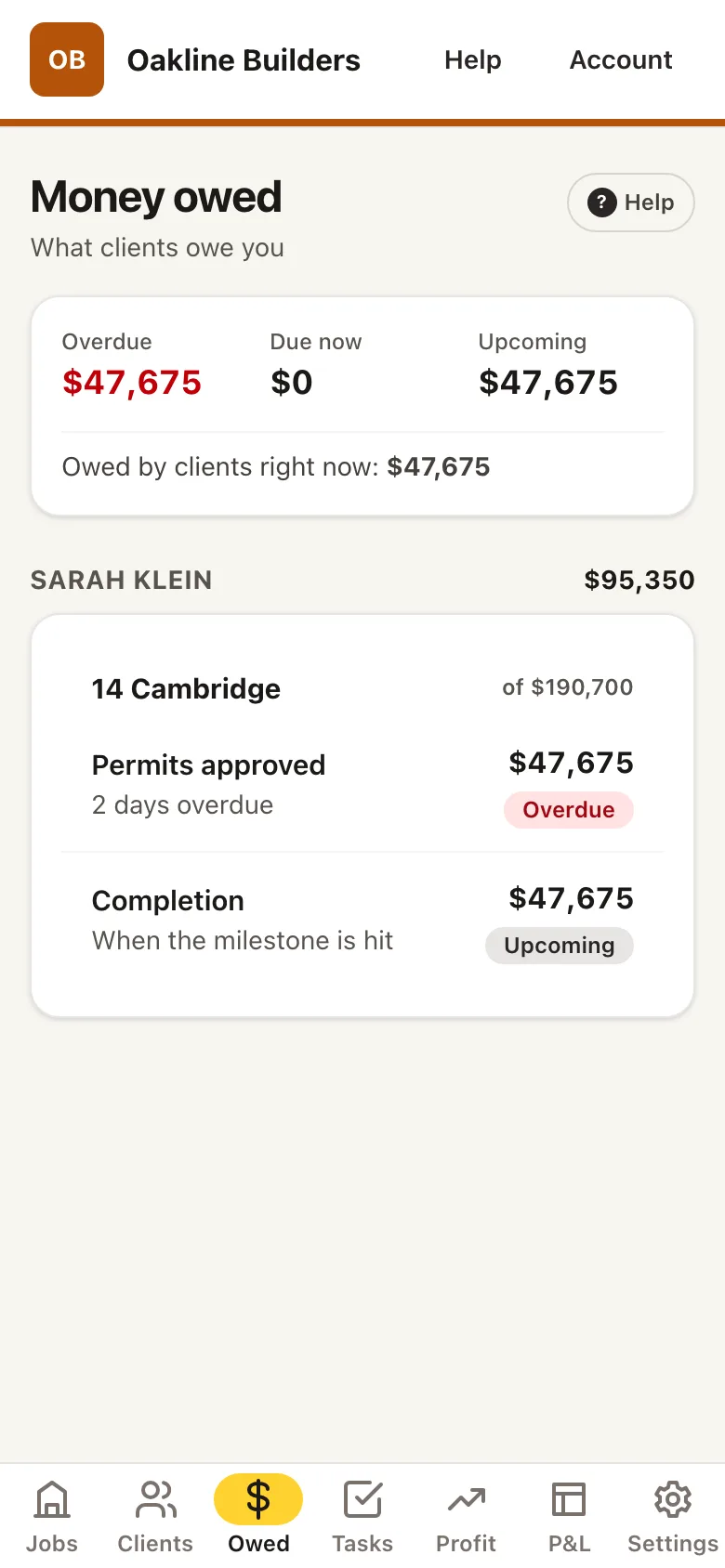
Payments that are paid or voided drop off the list. If nobody owes you, it says so.
Send a client their balance
Clients ask "where do I stand?" Instead of typing it out, say send her the balance.
Ask
Name the client or job. Any wording works.
Check the card
Nailed shows what it will send. Reply with the number for Send (on Telegram, tap the button).
The client gets an email
The subject is "Your balance for 14 Cambridge from Oakline Builders". It says what is paid and what is left, with a View balance button.
The button opens a read-only page with every payment and a PDF. It does not touch the quote. The job needs at least one payment logged first.
On the dashboard, open DashboardJobsyour jobPayments and tap Send balance.
A page that is always up to date
If you would rather the client check any time, send the client job page once. It stays current as payments come in. See what your client sees.
Common questions
How do I find out who owes me?
Ask Nailed "who owes me money", or open the Owed tab. Both show what is overdue, due now and upcoming.
Can I see what is left on one part of a job?
Yes. Ask in chat, for example "what's left on the framing".
How do I tell a client how much they have paid?
Say "send her the balance". Nailed shows a card, and when you confirm it emails her the amount paid and what is left, with a link to every payment.
Does the client see my costs or profit?
No. The balance page and the job page show only the price, payments, balance and documents. Never your costs, expenses or notes.
Did this answer your question?