Estimates and quotes
Create an estimate from a voice note, text or photo
Turn your numbers into a branded estimate PDF. Send a voice note, paste a list, or snap a photo of a handwritten estimate. Nailed adds it up exactly.
You can build an estimate by talking to Nailed, the way you would tell an office manager. Send the numbers, get back a clean quote with a total that is right to the cent.
Send the numbers
Use whatever is easiest on the job site. All three work the same way.
- Voice noteSay the lines and prices out loud.
- Type or pasteA list from your notes app or an old quote.
- PhotoSnap your handwritten estimate.
Say or send the numbers
Name the job or client if it is not obvious, then give the lines. Estimate for 14 Cambridge. Demo 1,800, cabinets 8,000, counters 4,500
Check the draft
Nailed sends back the quote with every line and the total, with the buttons Save, Edit and Send. The math is done by code, not guessed, so the total is exact.
Save it
Reply with the number for Save (on Telegram, tap the button). You get the branded PDF. Use Edit to change a line first.
Today
Estimate for 14 Cambridge
- Demolition
- $1,800
- Cabinets
- $8,000
- Counters
- $4,500
Reply with a number:
- Save
- Edit
- Send
If the job does not exist yet, Nailed creates it from the estimate. If the job already has a quote, new lines are added to it (the same name and price is not added twice). To start over instead, see edit an estimate.
Group the lines
Say the group first and the lines under it: Kitchen: cabinets 8k, counters 4,500. Groups show their own subtotal on the quote, which helps when a client wants to see what the kitchen costs versus the bath.
Things you can say
- Kitchen: cabinets 8k, counters 4,500
- Bathroom: tile 3,200, vanity 1,100, plumbing 2,400
- Add a dumpster, 650
- Optional: under-cabinet lighting 900
- Tile is an allowance of 2,500
Kinds of lines
Most lines are a plain price. When something is not a fixed price, tell Nailed and it labels the line so the client is not misled. Only regular prices count in the total.
| Kind | What it is | In the total? |
|---|---|---|
| Regular price | A fixed price for the work | Yes |
| Optional add-on | "If needed" or "if you want it", shown with its price | No |
| Rate | A unit price with no quantity, like "$9 / sq ft" | No |
| Selection or price range | The client picks, like "$600 to $1,000 each" | No |
| TBD | No price yet, shows "TBD" | No |
| Allowance | A regular price that is a placeholder | Yes |
An allowance is a regular price with a badge. The client sees that if the final cost is lower, the difference is credited, and if it is higher, a signed change order adds it. Only call something an allowance if you mean that.
Notes and exclusions
Add a closing note that prints at the bottom of the quote: add a note: permits not included. Use it for scope, exclusions, or a line of your own like "Thanks, Sarah. Call me with any questions."
What is private
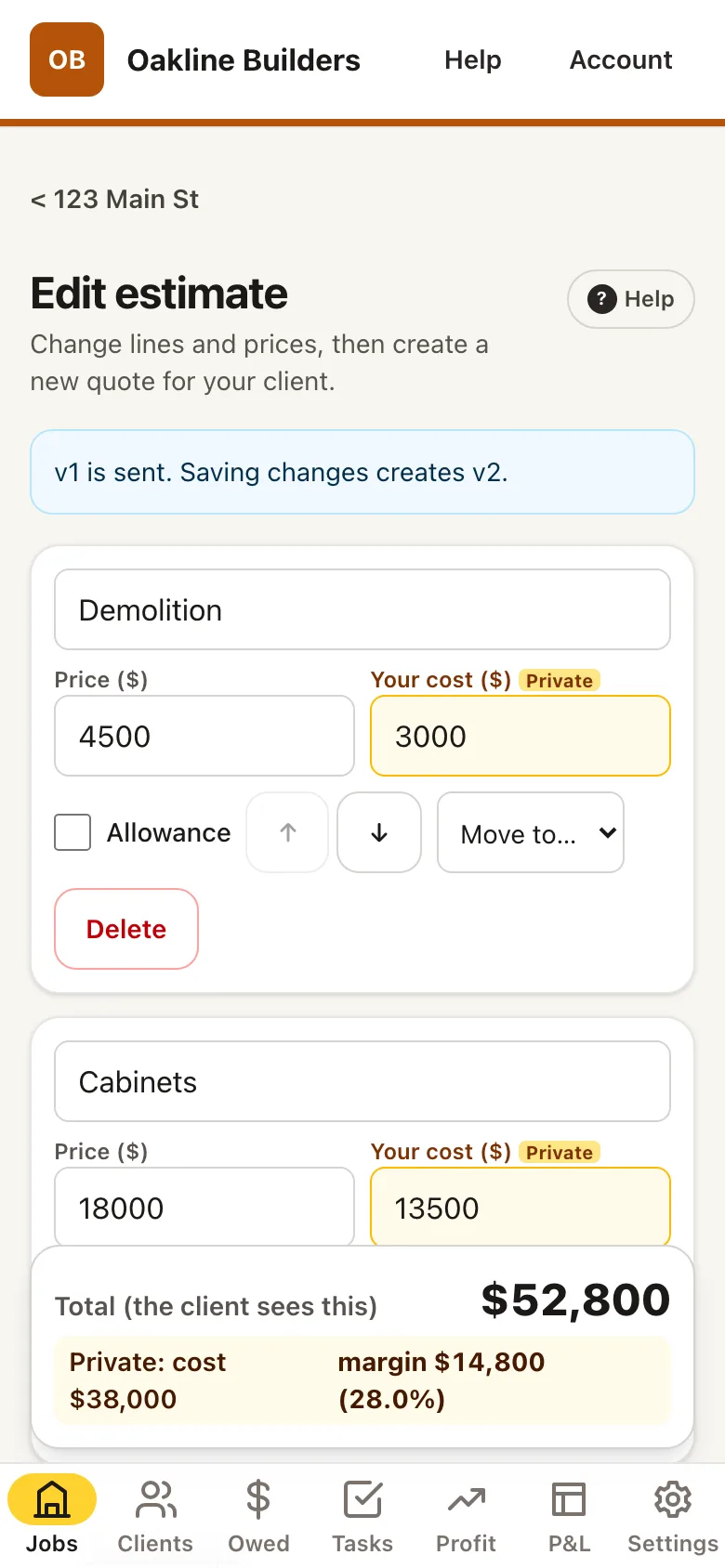
Your cost on each line is for you only. Add it on the dashboard under DashboardJobsyour jobEdit estimate, in the Your cost ($) field marked Private. Nailed uses it for your margin and for job profit. The client never sees cost or margin.
Tax and how long it is good for
- Tax: there is no automatic sales tax. If you charge it, add it as a line: add sales tax 450.
- Valid for: 30 days. The PDF says "Valid 30 days, until" and the date. An expired quote cannot be signed.
The PDF
The quote PDF carries your logo, company name, license and insurance lines (if you show them), the lines and total, the payment schedule and how to pay, and your notes. Set your look in quote branding and terms.
Estimates start in chat. On the dashboard you can change the lines of an estimate that already exists, see edit an estimate. Next, send it to your client.
Common questions
Can I make an estimate from a photo of my handwriting?
Yes. Send a photo of the handwritten estimate in chat. Nailed reads the lines and prices, adds them up, and shows you the quote before anything is saved or sent.
Does Nailed add sales tax?
No. There is no automatic tax. If you charge tax, say it as a line, like "add sales tax 450", and it goes into the total like any other price.
What does allowance mean on a quote?
An allowance is a fixed price for something the client picks later, like tile. If the final cost comes in lower, the difference is credited. If it comes in higher, a signed change order covers the extra. Only mark a line as an allowance if you mean that.
Can my client see what the job costs me?
No. Your cost on each line is private. The client sees prices, notes and the total, never your cost or margin.
How long is an estimate good for?
30 days. The date it is valid until prints on the PDF, and an expired quote can no longer be signed.
Did this answer your question?