Estimates and quotes
Edit an estimate, versions and changes after sending
Change a price, add or remove a line, start over, or go back to an earlier version, in chat or on the dashboard. See what happens to a sent or signed quote.
Estimates change. The client wants a different counter, or you forgot the dumpster. You can fix it in one message, or on the dashboard.
Change it in chat
Say what changed. Nailed shows you the result and waits for your OK before changing a quote the client has seen.
Things you can say
- Make plumbing 14k
- Add dumpster 650
- Remove the tile line
- Scrap the quote and start over
- Go back to v5
- Delete that quote
- Restore it
Today
Change the Lopez quote
- Plumbing
- $12,000 to $14,000
- New total
- $52,800 to $54,800
Reply with a number:
- Yes
- Cancel
"Scrap the quote and start over" replaces all the lines with a fresh quote. It does not work on a signed quote. "Delete that quote" removes the whole quote, every version, but the job stays. A signed quote cannot be deleted. "Restore it" brings a deleted quote back as a draft.
Versions
Every time you change a quote that was already sent or signed, you get a new version: v2, v3, and so on.
- Quote sentv1, client has the link
- You edit itv2 is made
- Old link stopsClient sees "This quote was updated"
- You send v2Client reviews and signs
A signed quote works the same, with one difference: the client has to sign the new version. The signed one stays on record as it was. If the job is already running and you only added extra work, a change order keeps the original contract.
Edit on the dashboard
Open the estimate
Go to DashboardJobsyour job and tap Edit estimate.
Change the lines
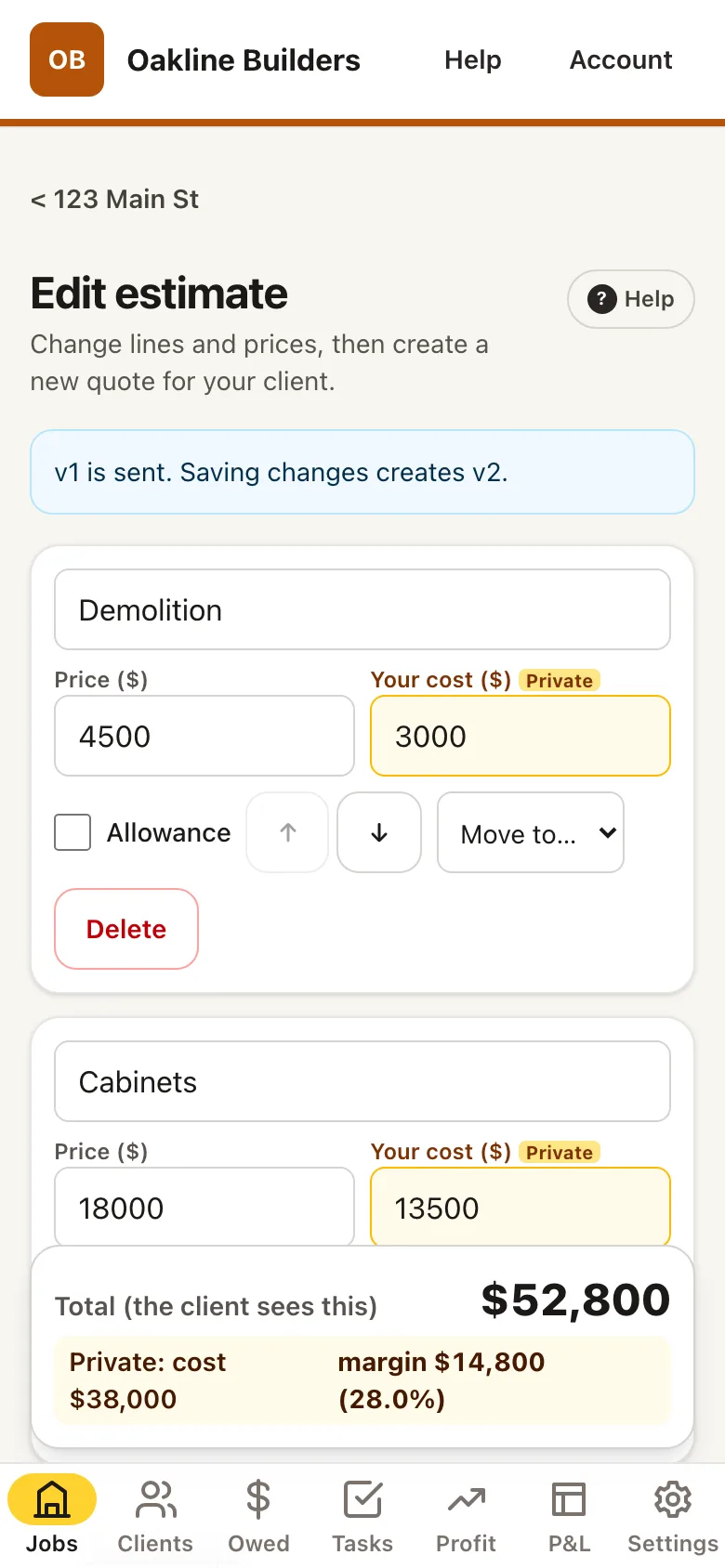
Edit a label or price. Use + Add line or + Add group for more. Each line has a Your cost (Private) box and an Allowance checkbox. To put a line inside a group, use Move to… (choose "Top level" to take it out).
Watch the total
The bar at the bottom shows Total (the client sees this) and, privately, your cost and margin.
Save
Tap Save draft to keep working, or Create new quote (vN) to lock the version and make the PDF. Then you can send it.
Under Estimated dates (optional) you can set a Start and Completion date. If you leave them empty, the quote says work starts about 2 weeks after signing.
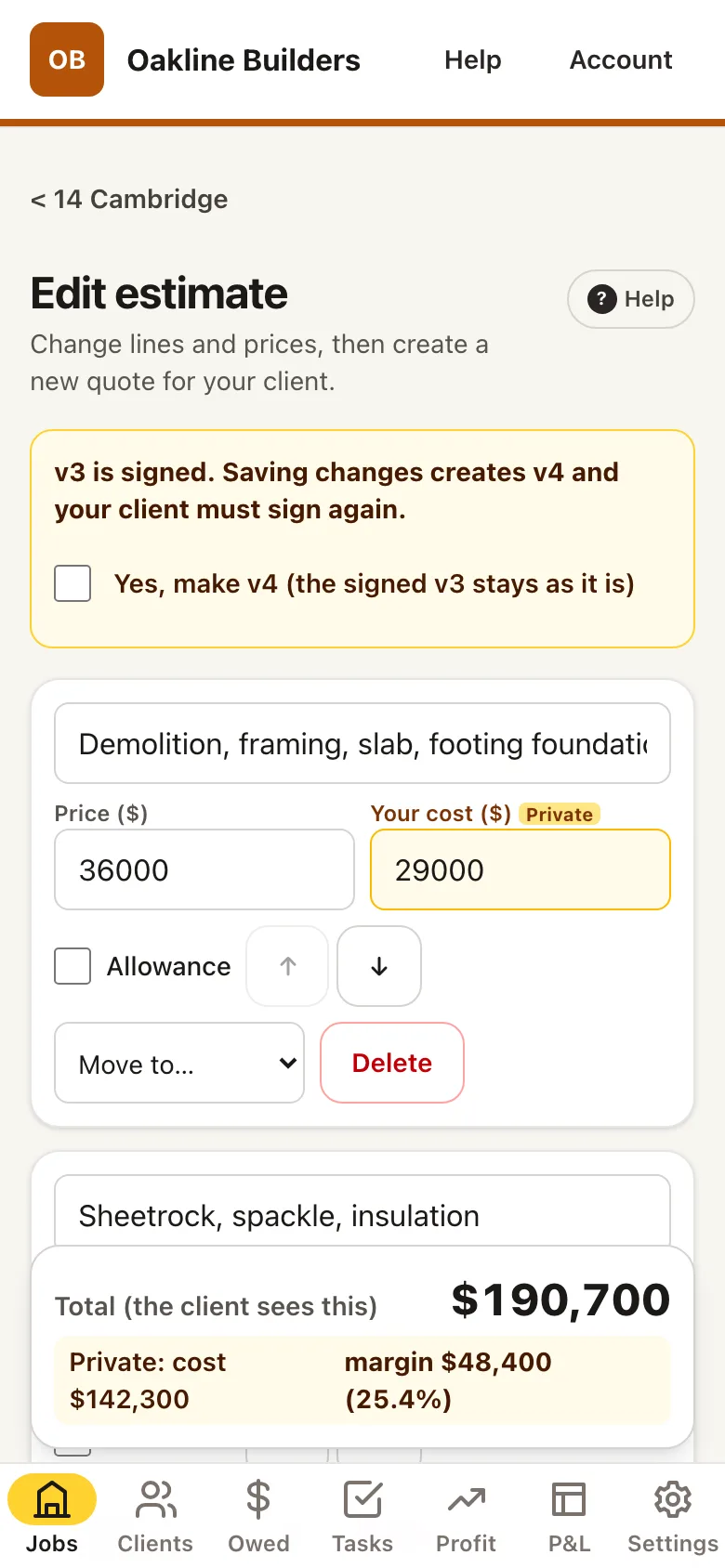
If the quote is signed, a banner says the signed version stays and saving creates the next one. Tick the box to confirm.
Quote PDF options
Below the editor, Quote PDF for this quote has two checkboxes: Show my license number and Show my insurance. Tap Save. It only changes this quote. Your standing choice is in Settings. Some states require license and insurance on the signed copy, so it prints there either way.
After you change it
Nothing reaches the client until you send it. Go on to send an estimate. To see what your client opens, read what your client sees.
Common questions
What happens if I change a quote I already sent?
Nailed makes a new version, like v2. The old link stops working, and a client who opens it sees "This quote was updated". You send the new version to the client.
Can I change a quote the client already signed?
Yes. Saving makes a new version and the client must sign again. The signed version stays as it is. For extra work on a signed job, a change order is often simpler.
Can I go back to an older version?
Yes. Say "go back to v5". It makes that old version current again, as a new copy.
Can I get a deleted quote back?
Yes. Say "restore it" and the quote comes back as a draft. Its old client link stays off until you send it again.
Why can't I edit a rate or range price on the dashboard?
Lines that are not a plain price show a tag, and the dashboard says "To change it, tell me in chat." Say the change in chat instead.
Did this answer your question?