Profit and reports
Read your monthly P&L: money in, money out
See what you collected, what you spent and your cash profit each month, overhead included. Check the P&L tab or ask in chat.
The P&L shows what came in and what went out in one month. It's the quick answer to "did I make money this month?"
On the dashboard
Open the P&L tab. The page is called Monthly P&L. It is cash basis, with overhead included.
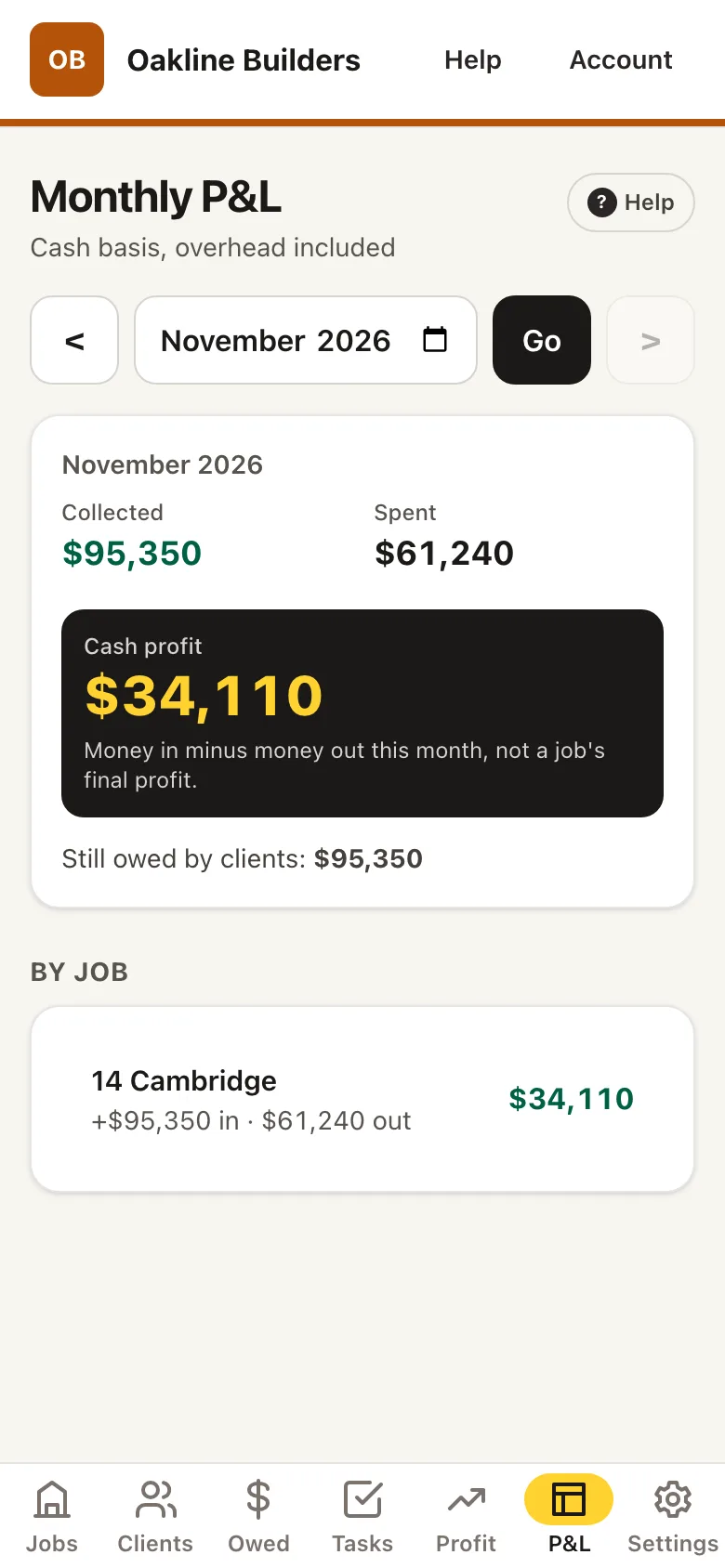
| Line | What it is |
|---|---|
| Collected | Payments you received this month |
| Spent | Confirmed expenses this month, overhead too |
| Cash profit | Money in minus money out this month, not a job's final profit |
| Still owed by clients | What clients still owe you today |
Under By job you see each job with what came in, what went out and the net. The row for costs with no job is overhead. Tap it to open Card charges filtered to overhead.
To change months, use the arrows or pick a month and tap Go.
Ask in chat
Today
Things you can say
- how's business this month
- how's business this year
- how much did I collect this week
On Fridays at 4pm you also get a short wrap by default: what you collected and spent that week, quotes sent and signed, and what clients still owe. See daily messages.
P&L or job profit?
They answer different questions.
| Monthly P&L | Job profit | |
|---|---|---|
| Counts | Cash in and out this month | The job's contract against its projected cost |
| Overhead | Included | Not included |
| Good for | "Am I ahead this month?" | "Is this job paying?" |
| Can mislead when | A deposit lands before the work is done | Costs aren't logged yet |
Make it accurate
The numbers are only as good as what you log. Send receipts as you get them (log expenses and receipts), sort card charges (sort bank charges), and log payments when they arrive. Check who still owes you in see who owes you.
Common questions
Is the P&L the same as job profit?
No. The P&L counts cash in and out during the month, with overhead. Job profit compares a job's contract to what it will cost. A month can look great because a deposit landed, even if the job isn't done.
What counts as Collected?
Payments you logged as received that month. Voided payments don't count.
Where do overhead costs show?
As a row in the By job list. Tap it to see the charges on the Card charges page.
Can I use this for my taxes?
It is for running your business, not for filing. You can share the numbers with your accountant.
How do I see a different month?
Use the arrows next to the month, or pick a month and tap Go.
Did this answer your question?