Talking to Nailed
Daily messages: morning brief, evening check, Friday wrap
When Nailed messages you on its own: morning brief, payment reminder preview, evening check, Friday wrap and task reminders. How to change the times.
Nailed does not wait to be asked. A few times a day it tells you what needs you, so nothing slips. Each message goes to you, once a day, on the chat you use.
What you get and when
| Message | When | What's in it |
|---|---|---|
| Morning brief | 9:00 on weekdays | Jobs starting or due today, your tasks, quotes sent but not opened or signed, change orders waiting for a signature, payments due or late, profit alerts |
| Payment reminder preview | 8:00 | The reminders going to clients at 10:00, with a Hold button for each |
| Evening check | 18:30 on weekdays | Receipts not saved yet, cards still waiting for your OK, late payments, new bank charges to sort |
| Week's wrap | Friday 16:00 | Collected, spent, quotes sent and signed, what clients still owe |
| Task reminder | The time you set | The task, with Done, Snooze 1h and Tomorrow |
All times are your company's local time. If there is nothing to say, Nailed says nothing. A quiet day is a quiet chat.
Today
Reply with a number:
- Nudge Birch Ln
- Later
Payment reminder preview
At 8:00 Nailed shows you which client reminders go out at 10:00. Reply to hold one, or tap Hold all. Anything you don't hold goes out at 10:00. Read more in payment reminders.
Task reminders
Say remind me to order the vanity Thursday. At the time, you get a message with the task and three choices: Done, Snooze 1h, Tomorrow. More in notes and tasks.
Quiet hours and weekends
From 21:00 to 08:00 (the default quiet hours) Nailed holds its evening check, questions about new card charges and payment reminders to clients until the window ends. The morning brief and week's wrap go out at the time you set. Weekends are off unless you turn them on in Settings.
Change it by chat
Things you can say
- Send the brief at 6:30
- Send the week's wrap on Thursday at 3
- Stop the evening check
- Turn the evening check back on
Settings made in chat are saved right away. Weekend messages and quiet hours are changed in Settings, below.
Change it on the dashboard
Open Settings
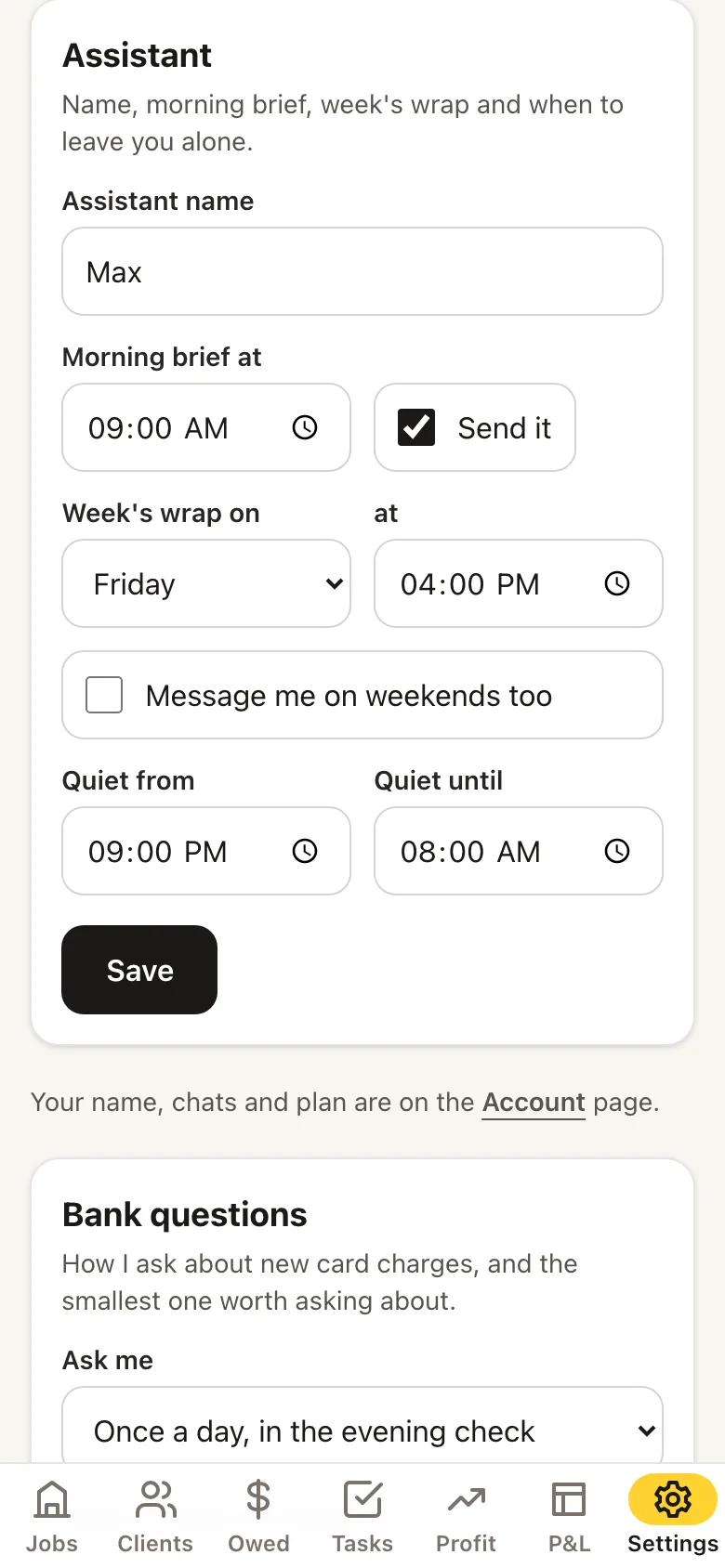
Go to DashboardSettingsAssistant.
Set your times
Change Morning brief at and tick or untick Send it. Set Week's wrap on (the day) and its time. Fill in Quiet from and Quiet until.
Weekends
Tick Message me on weekends too if you want messages on Saturday and Sunday.
Save
Save the section.
Common questions
What time does the morning brief come?
9:00 in your time zone, on weekdays. Change it by saying "send the brief at 6:30", or in Settings under Assistant. If there is nothing to report, it stays silent.
How do I stop weekend messages?
They are already off by default. If you turned them on, untick Message me on weekends too in Settings under Assistant. This one is a Settings option only, not something to ask for in chat.
What are quiet hours?
A window when Nailed holds some of its messages, like the evening check and client payment reminders, until it ends. The default is 21:00 to 08:00. Set your own with Quiet from and Quiet until in Settings.
Can I turn the morning brief off?
Yes. In Settings under Assistant, untick Send it next to Morning brief at.
What is the Friday wrap?
A short summary of the week: what you collected and spent, quotes sent and signed, and what clients still owe. It comes Friday at 16:00 by default.
Did this answer your question?