Clients and jobs
Create a job and add a new client
Start a new job in one message. Nailed adds the client and the job together, no form. Learn what to include, how job statuses work and where it shows.
You start a job by texting Nailed who the client is and where the work is. Nailed saves the client and the job together, no form and no card to confirm.
Say it in one message
Today
Here is what to include:
| Detail | Why it matters |
|---|---|
| Client name | First and last name, so you can find her later |
| Job address | The job gets its name from it, and Nailed uses it to tell jobs apart |
| Cell number | You can call or text her from the app |
| Quotes, reminders and job pages go by email today |
Not sure about the email yet? Send what you have. You can add it later, see edit client and job details.
Things you can say
- new job, Daniel Park, 88 Oak Ave, 973-555-0188
- new client Maria Lopez, 123 Main St, kitchen remodel, maria@example.com
- Kevin Brooks, 27 Birch Ln, he needs a bathroom redone
It applies at once
Creating a job does not move money or reach a client, so Nailed does not ask you to confirm. It is saved when you hit send. Made a mistake? Say undo within 30 minutes, or fix it on the dashboard.
Another way to start a job
Send an estimate for an address Nailed has not seen and it creates the job for you. Paste the numbers, send a voice note or snap a photo of your handwritten estimate. See create an estimate.
A second job for the same client
Say the client's name with the new address:
new job for Sarah Klein, 16 CambridgeBoth jobs stay under Sarah. Her client page shows each job and, once she has more than one, the totals across all of them.
Job statuses
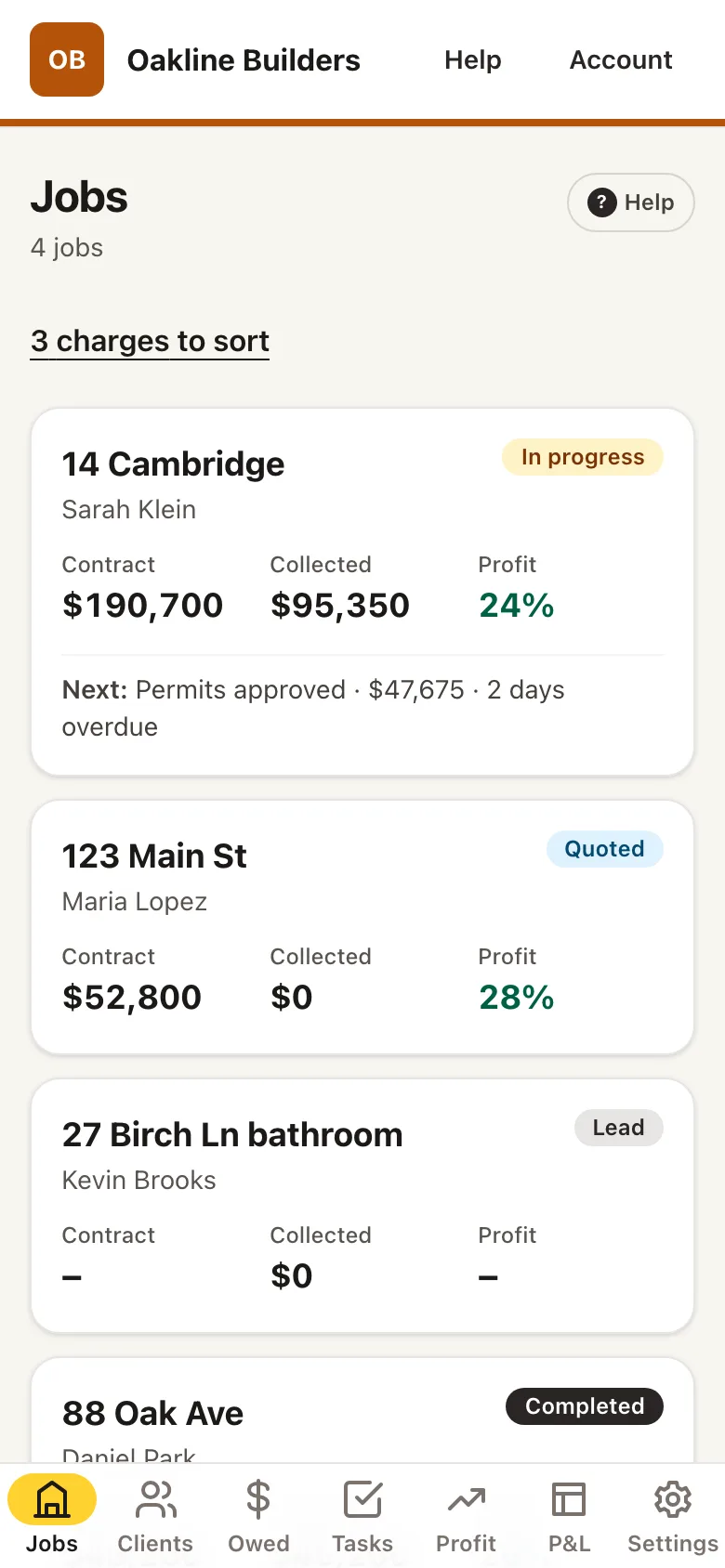
Every job has a status. It shows as a small label on the Jobs tab and at the top of the job page.
| Status | Meaning |
|---|---|
| Lead | You know about the job. No quote yet |
| Quoted | A quote has been made for it |
| Signed | The client signed your quote |
| In progress | Work has started on a signed job |
| Completed | The job is done |
| Cancelled | The job is dead, see cancel a job |
- You create the jobLead
- You make the quoteQuoted
- Client signsSigned
- You say "job's done"Completed, final payment due
The client signing is what makes a job Signed. Saying the job is done makes it Completed and the last payment due. You can also change a status by hand, see the rules in edit client and job details.
Where you see it
Open the dashboard and look under Jobs. Each job is a card with the client, a status label and the money so far. The new client appears under Clients with the phone number or email you gave. Nothing is added from the dashboard, so if a job is missing, text Nailed.
Next: create an estimate for the job, or read the job page to see where the job stands.
Common questions
Can I add a client from the dashboard?
No. Clients and jobs are created by chat. The dashboard is for changing them afterwards, under Jobs, your job, Edit job & client.
Does Nailed ask me to confirm a new job?
No. A new job and client are saved right away, with no card. If you typed something wrong, say "undo" within 30 minutes or fix it on the dashboard.
Do I need an email for the client?
It is the safest thing to give. Quotes, reminders and job pages reach clients by email today. With only a cell number, Nailed gives you a tap-to-text link that opens your own Messages app with the text already written.
Can the same client have two jobs?
Yes. Say the client's name again with the new address. The jobs sit under one client, and the client page adds up all their contracts.
How does a job get from Quoted to Signed?
When your client signs the quote, the job becomes Signed. Say "job's done" and it becomes Completed. You do not have to move it by hand.
Did this answer your question?